GPT Image 2.6 GIF guide for PagePop with 2 examples and prompts
Upload a photo or sketch to PagePop and turn it into a looping GIF. Explore two GPT Image 2.6 examples with prompts and fixes for a dancing pet and an animated sketch.
You can make a looping GIF in PagePop from a pet photo, a character reference, or a hand-drawn sketch. Upload your image and tell the assistant what should move, which details should stay the same, and how the action should return to its starting pose. If you’re still deciding what to animate, look through the examples for a motion that suits your image. Browse GPT Image 2.6 examples and prompts
Make a GIF from one image in PagePop
- Upload your reference image. Open Image Editing Expert and upload an image with a clear outline of your subject. A front-facing character works well for a blink, a full-body pet photo for a small dance step, and a line drawing as the basis for a character design.
- Describe what should move. Start with one action, such as “Raise one front paw, pause, then put it back down.” Specify the aspect ratio and any details you want to keep, such as the face shape, colors, or background.
- Bring the action back to the start. Say exactly where the character should end up. For example, “Put the front paw back where it started and look straight ahead again.” Keep the camera fixed.
- Preview and download the GIF. Ask for “a downloadable looping GIF.” Watch it play two or three times to check that the motion loops smoothly, then save the file.
If you’re unsure how to describe the motion, copy a prompt from one of the examples below and adapt it to your image.
Example 1 — A pet dances and returns to its starting spot
This wide shot of a dancing Pomeranian works well as an animated cover. For this example, PagePop assembled individual frames, kept the dog centered, and fixed the pink stage and front-facing camera so you can see the skirt and paws move. To try it with your pet, choose a photo that clearly shows all four legs and leaves space around the paws and on both sides of the body.
Use my uploaded pet photo as a reference to make a 16:9 looping dance GIF. The pet starts in the center of the stage, takes a small half-step to the left, lifts one front paw, then returns to its original spot. Keep the face shape, fur color, body proportions, and outfit consistent. Use a fixed front-facing camera. At the end, match the gaze direction and paw height of the starting pose.
If the pet jumps sideways when the second loop begins, simplify the dance to a single paw lift in place. Once the loop plays smoothly, add the side step and skirt movement. See the dancing Pomeranian example
Example 2 — Turn a sketch into a character before animating it
The animated owl keeps the large round eyes, pointed ear tufts, and round body of the hand-drawn sketch. With your own drawing, name three features like these in your request. Once you’re happy with the design, ask for a small motion such as a wing lift. Compare the owl sketch and animation
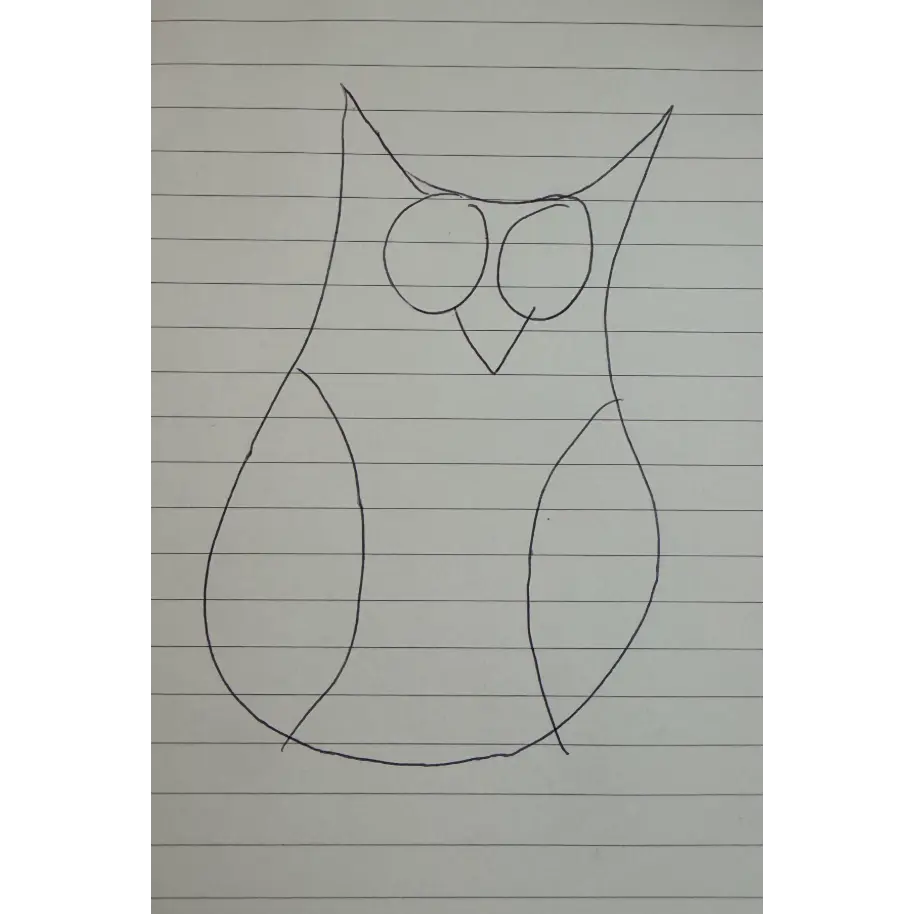
Use my hand-drawn sketch to create a front-facing owl. Keep the large round eyes, pointed ear tufts on either side, and round body. Show me a still image first so I can approve the design. Once I’ve approved it, have the owl lift one wing slightly and lower it again. Keep the camera, background, and eye positions fixed, and make a GIF with a smooth loop.
If the markings on the owl’s chest change when the wing moves, cut the wing lift in half and add “Move only the wingtip. Keep the pattern and position of the chest feathers from the approved design.”
Three things to check in your GIF
| Problem | How to fix it |
|---|---|
| The GIF jumps when it loops | Describe exactly where the motion should end. For example, “Return the front paw to the same spot on the ground and look straight ahead again.” |
| The character changes size and the background moves | Go back to the approved reference image, simplify the request to one action, and keep the subject’s size, camera, and background fixed. |
| The result stays still | Specify the action and the file you want. For example, “Have the character blink once and deliver a looping GIF file.” |
If you’re using the GIF in a chat, preview it at sticker size. For a wide cover, check that paws, ears, and any title area stay within the frame throughout the motion.
A photo or sketch is all you need to get started. When you need ideas for what to animate, browse the finished examples and their prompts. Start creating with Image Editing Expert · Browse GPT Image 2.6 examples